[1] 5.5Constructional Alignment and Learning Goals
Sarah von Grebmer
12/04/2026
Credit statement and licence
Possible roles using the CRediT contribition system:
Conceptualization: Ideas; formulation or evolution of overarching research goals and aims
Methodology: Development or design of methodology; creation of models
Software : Programming, software development; designing computer programs; implementation of the computer code and supporting algorithms; testing of existing code components
Validation: Verification, whether as a part of the activity or separate, of the overall replication/ reproducibility of results/experiments and other research outputs
Formal analysis: Application of statistical, mathematical, computational, or other formal techniques to analyze or synthesize study data
Investigation: Conducting a research and investigation process, specifically performing the experiments, or data/evidence collection
Resources: Provision of study materials, reagents, materials, patients, laboratory samples, animals, instrumentation, computing resources, or other analysis tools
Data Curation: Management activities to annotate (produce metadata), scrub data and maintain research data (including software code, where it is necessary for interpreting the data itself) for initial use and later reuse
Writing - Original Draft: Preparation, creation and/or presentation of the published work, specifically writing the initial draft (including substantive translation)
Writing - Review & Editing: Preparation, creation and/or presentation of the published work by those from the original research group, specifically critical review, commentary or revision – including pre-or postpublication stages
Visualization: Preparation, creation and/or presentation of the published work, specifically visualization/ data presentation
Supervision: Oversight and leadership responsibility for the research activity planning and execution, including mentorship external to the core team
Project administration: Management and coordination responsibility for the research activity planning and execution
Funding acquisition: Acquisition of the financial support for the project leading to this publication
Prerequisites
Prerequisites
Before completing this submodule, please carefully read about the necessary prerequisites.
| Prerequisite | Description | Link/Where to find it |
|---|---|---|
| Topic Name | Basic intro to X | Module + Submodule |
| Software Name | Configuring the environment | Download Link |
Questions from previous submodule
- Aim: This first slide is dedicated to clarifying questions from the previous submodule and/or to discuss assignments.
- Additional slides may need to be added depending on the nature of the homework assignments.
- Critical for the learning process to ensure that students are on the same page and have been able to achieve the learning goals of the previous workshop.
- Not applicable if this set of slides corresponds to the first submodule of a new module.
Before we start: Survey time!
- Aim: The pre-submodule survey serves to examine students’ prior knowledge about the sumodule’s topic.
- Use free survey software such as or other survey software (particify, formR) to establish the following questions (shown on separate slides):
What is your level of familiarity with [Topic] (e.g., basic concepts, terminology, or tools)?
I have never heard of it before.
I have heard of it but have never worked with it.
I have basic understanding and experience with it.
I am very familiar and have worked with it extensively.
Which of the following concepts or skills do you feel most confident about in relation to [Topic]? (Select all that apply)
Concept 1
Concept 2
Concept 3
Concept 4
I am not sure about any of these concepts.
On a scale of 1 to 5, how comfortable are you with using [specific tool/technology] related to [Topic]? (1 = Not comfortable at all, 5 = Very comfortable)
1
2
3
4
5
Discussion of survey results
- Aim”: Briefly examine the answers given to each question interactively with the group.
- Use visuals from the survey to highlight specific answers.
Where are we at?
- Aim: Place the topic of the current submodule within a broader context.
- Remind students what you are working towards and what the bigger picture is.
Learning goals
Aim: Formulate specific, action-oriented goals learning goals which are measurable and observable in line with Bloom’s taxonomy (Anderson et al., 2001; Bloom et al., 1956)
Place an emphasis on the verbs of the learning goals and choose verbs that align with the skills you want to develop or assess.
Examples:
- Students will describe the process of photosynthesis or
- Students will construct a diagram illustrating the process of photosynthesis
Covered in in this session
- Aim: This slides serves as an overview of the topics that are discussed, presented as bullet point:
(for now copied from Didactis2 go, use as basis only)
- Constructivism
- Constructive alignment
- Setting learning goals
- AVIVA-Schema
- Activation methods
- Reflection
How much teaching experience do you have?
- e.g., workshops, peer training, (guest) lectures etc.
How much have you already thought about didactics?
How big are your teaching/training audiences?

Constructivism in learning
As a process, learning is …
- active and self-controlled
- student-centered
- integrated in a broader context and a positive learning atmosphere
- social and emotional
Efgivia et al., 2021
Constructivism: Core aspects
- Knowledge is actively constructed by the learner, not imposed
- Learners bring exisiting concepts to learning situations
- Existing ideas need to be incroporated into teaching in order to challenge/change these
- Learners construct knowledge through interaction with physical world/ social settings and within specific cultural/linguistic environments
- Learning environment is integrated into the learning process
Sjoberg, 2010; Tauber, 2006
Constructional alignment
Focus here on learning objectives: what do we want (our audience) to achieve?
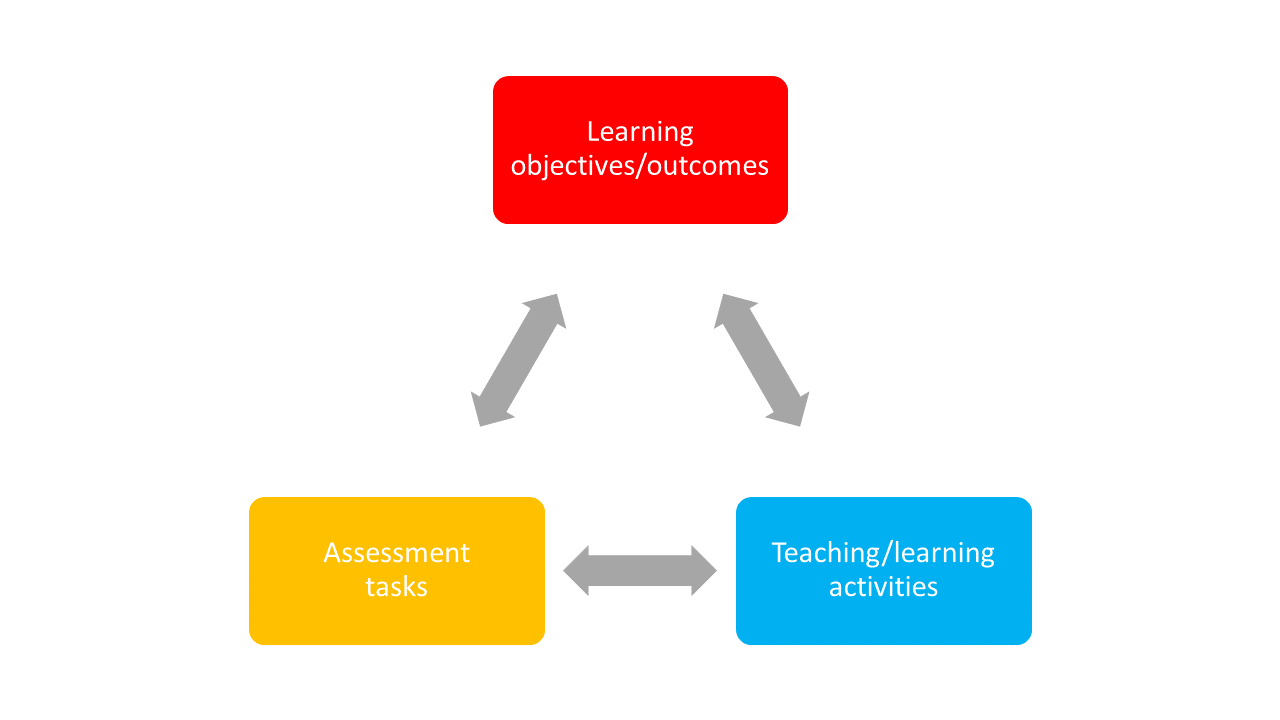
Biggs, 1996
“Hierarchy” learning objectives
- What is the general objective of this course?
- What are specific individual learning objectives?
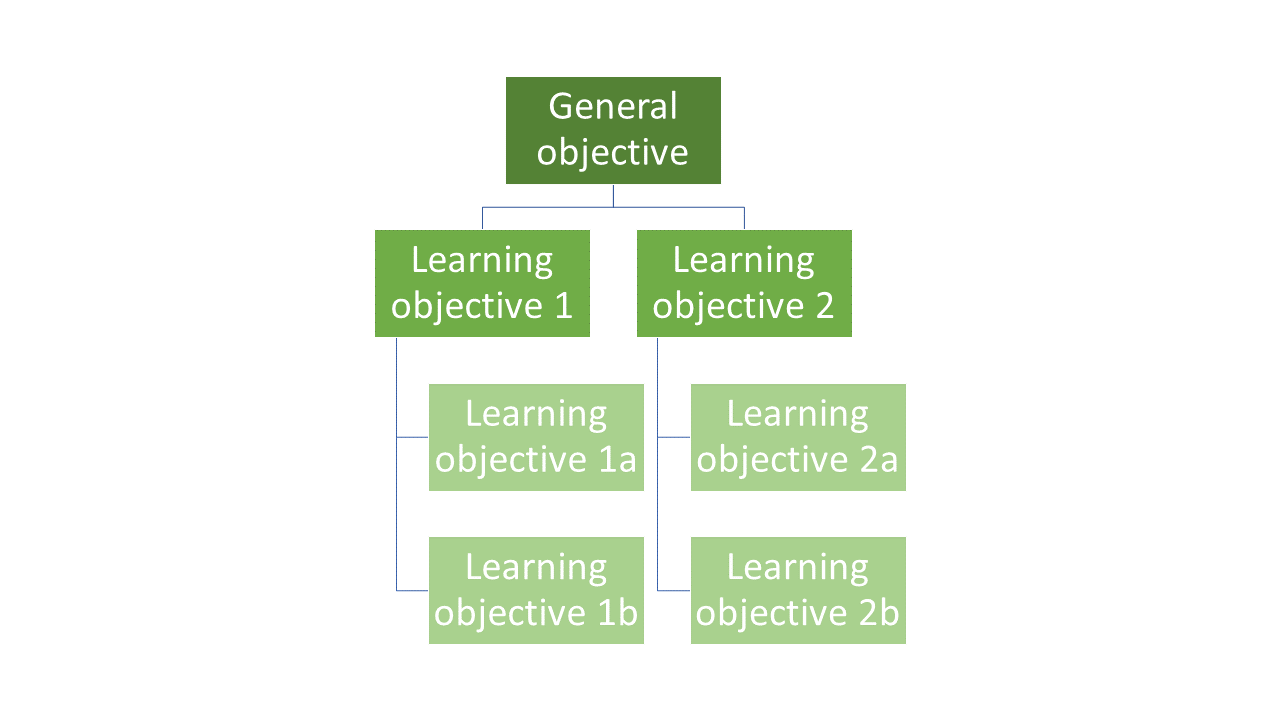
Bloom’s taxonomy
- Three learning domains: cognitive, affective, psychomotor (https://teaching.uic.edu/cate-teaching-guides/syllabus-course-design/blooms-taxonomy-of-educational-objectives/)
| cognitive | affective | psychomotoric |
|---|---|---|
| origination | ||
| create | adaptation | |
| evaluate | characterising | complex overt response |
| analyse | organising | mechanism |
| apply | valuing | guided response |
| understand | responding | set |
| remember | receiving | perception |
Additional slides on learning goals
Examples
Can you think of examples from your own experience on what aligned learning outcomes, assessment tasks and teaching activities could look like in practise?
Formulating learning objectives
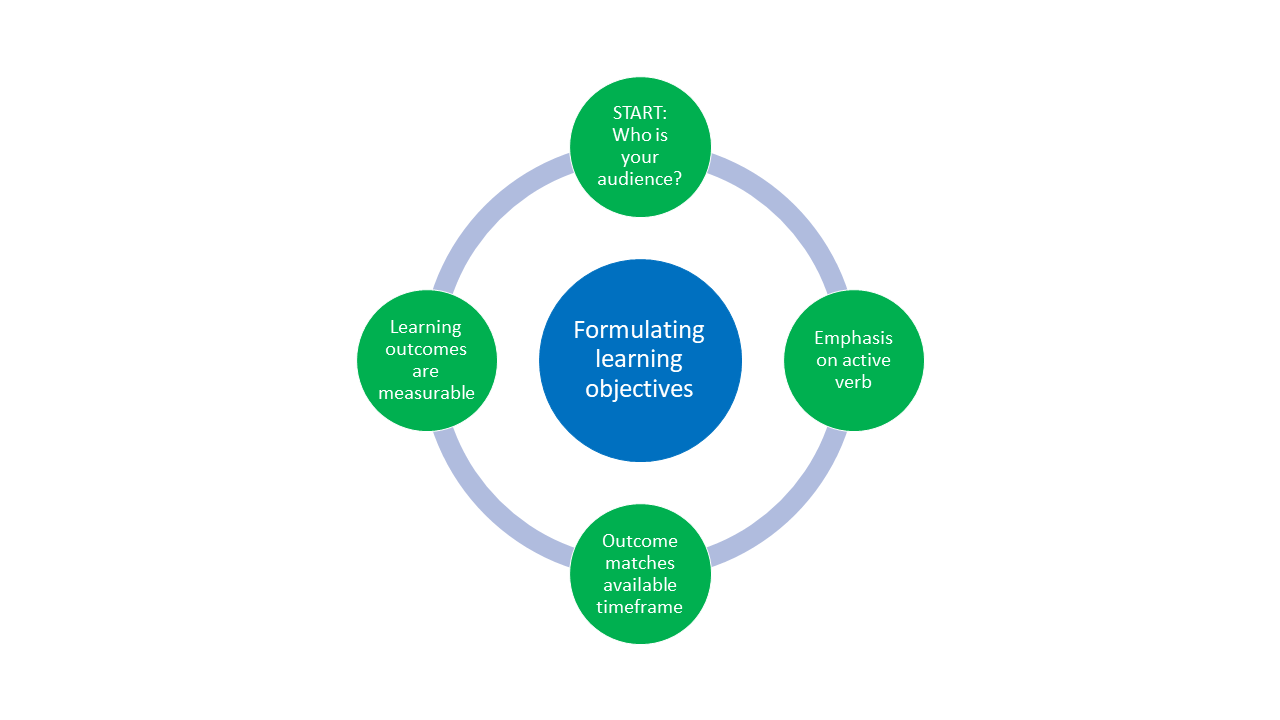
Example: Formulate one learning objective for your own seminar.
Structuring your course
- Check your working conditions: how much time do I have? How long are the sessions? Mielstones?
- Plan time for orientation during first and last session: who is who? What is happening? What is expected? What remains unclear?
- Formulate learning objectives for course
- Formulate learning objectives for each session
Attitude towards your audience
What can you do to create a positive learning environment?
Attitudes towards your audience: Verbal
- Small-talk (yes, it is important)
- Call by name
- Validate and show appreciation
- Paraphrase what audience members express
- Give tangible examples
- Ask open questions
- Accept silences
Attitudes towards your audience: body language
- Maintain eye contact with students
- Use non-verbal communication (shake head, use hands)
Attitudes towards your audience: methods
- Have introductory round
- Motivate audience to get involved as early as possible
- Observe the room
- Use different visualisation methods/tools
Interactive teaching methods
transition to activation method
Your turn!
Take 20 minutes in pairs to practise an activation method of your choice in the context of a topic of your choice. Each pair demonstrates the activity in “class”, with the rest acting as audience.
Literature
Antosch-Bardohn, J. (2018): Nicht-intentionale Lernprozesse im Alltag von Studierenden. Logos Verlag.
Antosch-Bardohn, J., Beege, B., & Primus, N. (2019). In die Lehre starten. UTB GmbH.
Antosch-Bardohn, J. (2019): “Für mein Thema brennen die Studis” - Lernmotivation in der Hochschullehre. In: Neues Handbuch Hochschullehre. Nummer 89, S. 1-18.
Hofmann, E. & Löhle, M. (2004). Erfolgreich lernen. Hogrefe Verlag.
Kergel, D. & Heidkamp-Kergel, B. (2020). E-Learning, EDidaktik und digitales Lernen. Springer VS.
Thank you!
Key terms and definitions
Aim: Introduce key terms and definitions that students will come across throughout the session.
Key Term 1: Definition
Key Term 2: Definition
Key Term 3: Definition
Introduction of submodule topic
- Aim: Core theoretical introduction of submodule topic.
- Pair theoretical aspects with practical exercises and group discussions according to the Think-Pair-Share style and according to Cognitive Load Theory (Sweller, 1980).
- Use multiple slides for this part.
Submodule content slide
- Aim: Present relevant content
- Highlight particularly important aspects with Quarto call-out boxes, for example:
Important with Title
This is an example of a callout box to highlight particularly important information.
Tip with Title
This is an example of a callout box to give important tips.
Practical exercise 1
Aim: Design more practical exercises for students to apply the new skills in practise.
Depending on the topic, the exercises should be in accordance with the learning objective(s).
Add a description of the task, as well as a checklist as an overview of that your students need to be doing.
Pre-break survey
- Aim: This pre-break survey serves to examine students’ current understanding of key concepts of the submodule
Use free survey software such as or other survey software (particify, formR) to establish the following questions (shown on separate slides):
Which species is the largest type of penguin?
Chinstrap Penguin
Emperor Penguin ✅
Adélie Penguin
King Penguin
What is the key biological feature that helps penguins swim efficiently?
Hollow bones for buoyancy
Webbed feet for paddling
Waterproof feathers and flipper-like wings ✅
Gills to breathe underwater
Break! 15 minutes
Post-break survey discussion
- Aim: To clarify concepts and aspects that are not yet understood
- Highlight specific answers given during the survey
Practical Exercise 2
Aim: Design more practical exercises for students to apply the new skills in practise.
Depending on the topic, the exercises should be in accordance with the learning objective(s).
Add a description of the task, as well as a checklist as an overview of that your students need to be doing.
Relevance and implications
- Aim: To work out the relevance of the topic to your students.
- In an interactive setting, discuss how the new skills could be applied in practise with specific examples.
- Examine downfalls and practical obstacles.
Take-home message
Aim: End lesson on clear take-home message that are interactively compiled by students.
Tip with Title
Add one practical tips or take-home message.
Assignment
- Aim: Explain the homework assignment and the rationale behind the homework.
- Examine whether/how it will be assessed
- Mention scoring rubrics, if applicable
- Design a peer-review system for assignments to place students in role of reviewer and author
To conclude: Survey time!
- Aim: This post-submodule survey serves to examine students’ current knowledge about the sumodule’s topic.
- Use free survey software such as or other survey software (particify, formR) to establish the following questions (shown on separate slides):
What is your level of familiarity with [Topic] (e.g., basic concepts, terminology, or tools)?
I have never heard of it before.
I have heard of it but have never worked with it.
I have basic understanding and experience with it.
I am very familiar and have worked with it extensively.
Which of the following concepts or skills do you feel most confident about in relation to [Topic]? (Select all that apply)
Concept 1
Concept 2
Concept 3
Concept 4
I am not sure about any of these concepts.
On a scale of 1 to 5, how comfortable are you with using [specific tool/technology] related to [Topic]? (1 = Not comfortable at all, 5 = Very comfortable)
1
2
3
4
5
Discussion of survey results
- Aim: Briefly examine the answers given to each question interactively with the group.
- Compare and highlight specific differences in answers between pre- and post-survey answers
References
- Provide literature you refer to throughout this lesson.
Thanks!
See you next class :)
Pedagogical add-on tools for instructors
- This section is dedicated to ideas on how to incorporate pedagogical tools into teaching for this specific submodule topic. This could mean:
- Information about the scientific evidence on the theory of the pedagogical add-on tool and the evidence for its efficacy.
- Discussion/reflection on how tools can be incorporated into the teaching for this particular content.
- Extra exercises for faster students.
Additional literature for instructors
- References for content
- References for pedagogical add-on tools
- Other resources (videos etc.)
Formatting elements for instructors
- Aim: This section contains templates for different formatting elements, which can be modified and adapted for the instructor’s individual purposes.
Text with example links
Basic text formatting
- Bold:
**bold**→ bold - Italic:
*italic*→ italic Strikethrough:~~text~~→textInline code:`code`→codeBlockquote:
> Quote→
“This is a quote”
Figure with caption
- Centered image and caption below in italics

This is a Penguin.
Figure with bullet points
- First bullet point
- Second bullet point
- Third bullet point
Side-by-side figures
Figure 1: Penguin
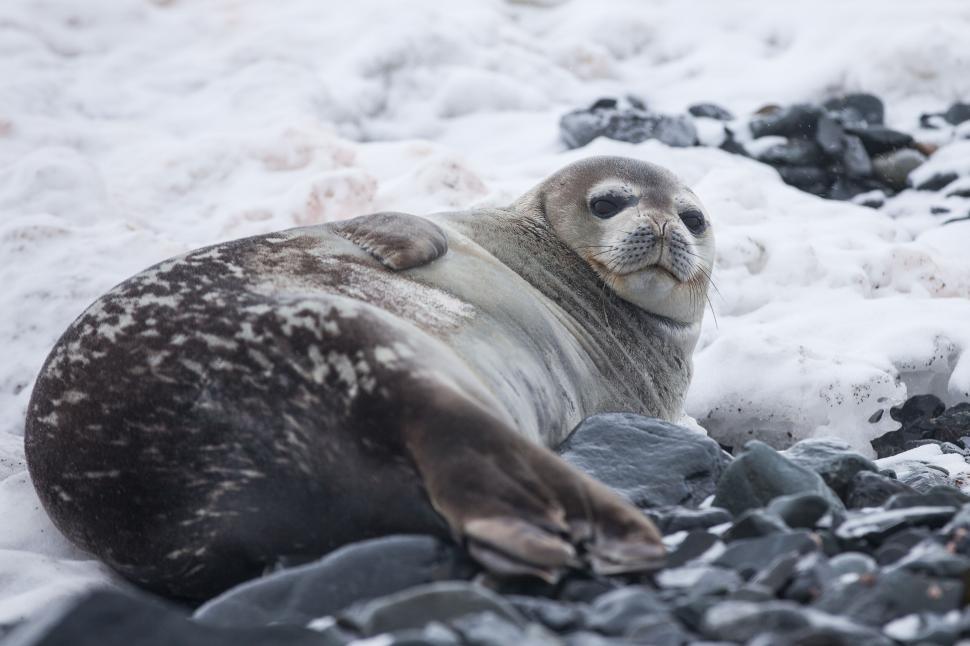
Figure 2: Seal
Stacked figures with text
- First bullet point
- Second bullet point
- Third bullet point
Two-column text slide
Column 1
Lorem ipsum dolor sit amet, consectetur adipiscing elit.Vivamus lacinia odio vitae vestibulum vestibulum.
Cras venenatis euismod malesuada.
Column 2
Sed do eiusmod tempor incididunt ut labore et dolore magna aliqua.Ut enim ad minim veniam, quis nostrud exercitation ullamco laboris.
Three-column text slide
Column 1
Lorem ipsum dolor sit amet, consectetur adipiscing elit.Vivamus lacinia odio vitae vestibulum vestibulum.
Column 2
Sed do eiusmod tempor incididunt ut labore et dolore magna aliqua.Ut enim ad minim veniam, quis nostrud exercitation ullamco laboris.
Column 3
Duis aute irure dolor in reprehenderit in voluptate velit esse cillum dolore eu fugiat nulla pariatur.Simple table
| Column 1 | Column 2 | Column 3 |
|---|---|---|
| Row 1 Cell | Row 1 Cell | Row 1 Cell |
| Row 2 Cell | Row 2 Cell | Row 2 Cell |
| Row 3 Cell | Row 3 Cell | Row 3 Cell |
| Row 4 Cell | Row 4 Cell | Row 4 Cell |
Complex table
| Column 1 | Column 2 | Column 3 |
|---|---|---|
| Row 1 Cell | Row 1 Cell | Row 1 Cell |
| Row 2 Cell | Row 2 Cell | Row 2 Cell |
| Row 3 Cell | Row 3 Cell | Row 3 Cell |
| Row 4 Cell | Row 4 Cell | Row 4 Cell |
Task list
Embedding videos
Code blocks
Attribution and license details
This slide should contain information about the license and attribution details of this current set of slides.
The default for the created materials is CC-BY-SA 4.0
- = Creative Commons license that allows others to share, adapt, and build upon the original work
- only if they attribute the creator and also share their new work under the same terms
- allows for both commercial and non-commercial use of the licensed material
Components of attributions:
TitleAuthorSourceLicense
Example attribution (for previous slide)
“Tutorial template for student track” by Sarah von Grebmer is licensed under CC-BY-SA 4.0.

LMU Open Science Center