[1] 9Introduction to R: Part I
Caterina Luz Sanchez Steinhagen, David Rieger and Elizabeth Waterfield
14/10/2026
Prerequisites
Important
Before completing this session, please carefully read about the prerequisites.
| Prerequisite | Description | Where to find it |
|---|---|---|
| R and RStudio installed | Latest versions of both R and RStudio | Download RStudio |
| Accessibility sheet for computers | Fundamentals of computer literacy | Download |
Before we start: Survey time!
What is your level of familiarity with R and RStudio?
I have never heard of it before
I have heard of it but have never worked with it
I have basic understanding and experience with it
I am very familiar and have worked with it extensively
On a scale of 1–5, how intimidated do you feel by programming or coding (e.g., R/RStudio)?
(1 = Not intimidated at all, 5 = Very intimidated)
1
2
3
4
5
Have you used any programming language (R, Python, JavaScript, C) before?
No, never
Yes, a little (e.g., basic commands)
Yes, moderately (e.g., small projects)
Yes, extensively (e.g., on an almost daily basis)
Discussion of survey results
What do we see in the results?
Learning goals
At the end of this session, you will be able to …
- Navigate the RStudio interface (Console, Environment, Script, and Output panes).
- Differentiate between basic data types in R (numeric, character, logical, integer) and how they are used.
- Execute operations in the Console and R Script using appropriate operators.
- Assign and re-assign values, vectors, and lists to objects.
- Specify arguments within functions to modify how the function produces its output.
- Index dataframes to access and retrieve specific information.
Key terms and definitions
You might see some words for the first time or some familiar words used in a different way. What do you associate with the terms below?
- RStudio
- R command
- Run
- Comment
- Operator
- Operation
Key terms and definitions
- RStudio: A program that provides an easy-to-use interface for writing and running R code.
- R command: A line of code that tells R to do something.
- Run: To execute an R command so that R carries out the instruction and shows the result.
- Comment: Text in your code (starting with
#) that R ignores. You can use this function to explain what the code does or make notes throughout your work. - Operator: A symbol (such as
+, -, *, <,or==) that tells R to perform a specific action. - Operation: The action performed using one or more operators on data or values.
What is R?
R (https://www.r-project.org/) is an free and open source programming language
- Originally designed by statisticians for statisticians
- Wide range of applications: data manipulation, visualization, interactive web applications, generation of full manuscripts and reports
Why R?
- Knowledge of statistical software like R is useful when conducting quantitative research
- Has a large online support community
- Provides freely available resources
The RStudio environment
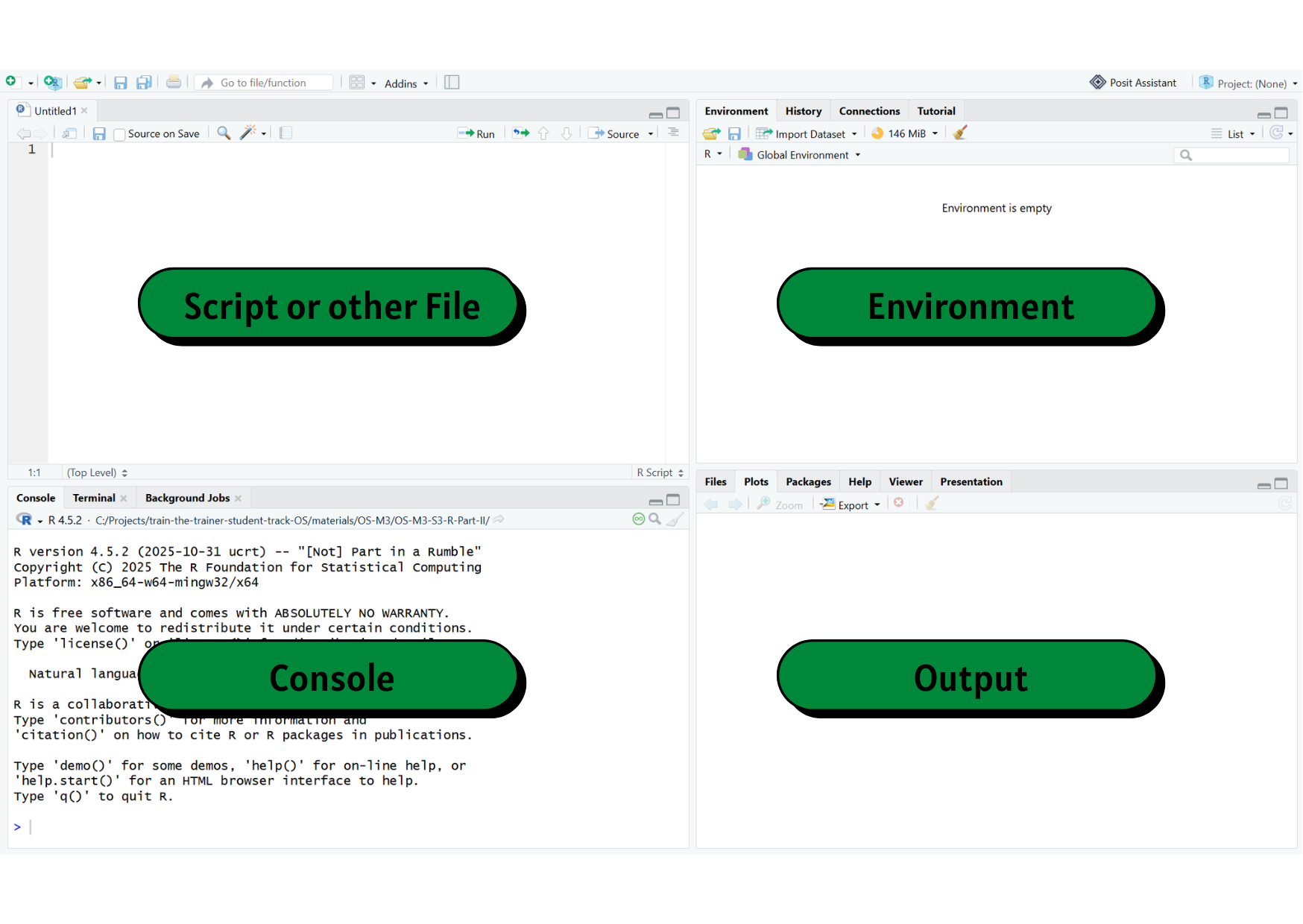
Open RStudio and check if you can see everything that’s on the slide.
(You might only see three panes on your screen)
Mathematical operations
| Symbol | Operation |
|---|---|
+ |
Addition |
- |
Subtraction |
* |
Multiplication |
/ |
Division |
^ |
Exponentiation |
sqrt() |
Square Root |
log() |
(Natural) Logarithm |
Practical exercise 1
Using the table on the previous slide, run the following math operations directly in the Console of RStudio.
Let’s use the Console!
You can run code from the Console by typing in the Console and then pressing Enter on your keyboard.
The R script
An R script is a text file containing your R commands.
It is an easy way to save and share code
You can run code from an R script by:
- Pressing Ctrl + Enter (Windows) OR Command + Enter on a (Mac) on the keyboard
- click on Run
- Pressing Ctrl + Enter (Windows) OR Command + Enter on a (Mac) on the keyboard
You can also add comments or notes to your code by using
#
Creating a new R script
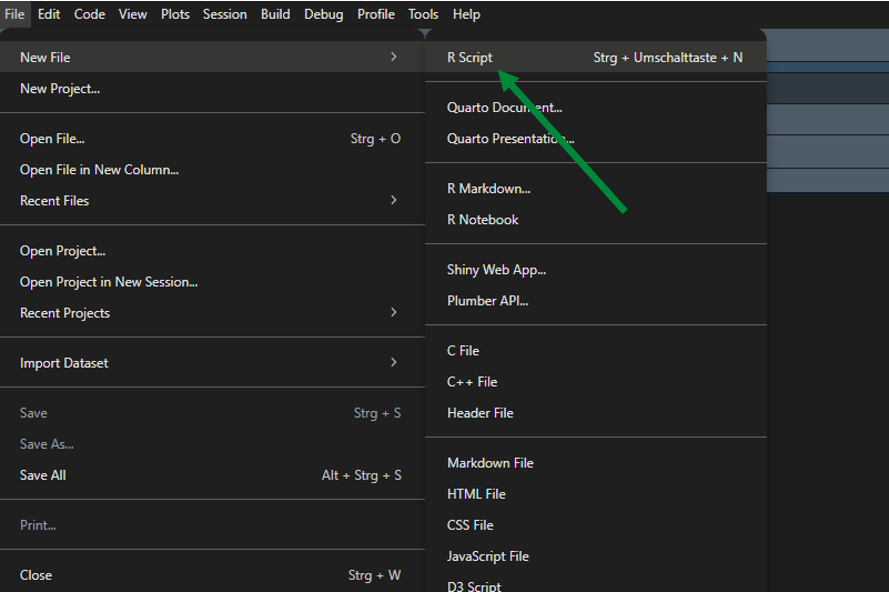
Saving an R script
Step 1: On your device
- Decide where this R script should go
- Create a new folder

Step 2: In RStudio
- After making a new R script, click on
File→ then clickSave As... - → Name the file → then choose the designated folder
- → Click
Save
Practical exercise 2
Logical comparisons
With R, you can also:
Check if two numbers are equal or unequal
Check if a number is larger or smaller than another number
R returns a logical value:
TRUEorFALSE
Logical comparisons - operators
| Symbol | Operation |
|---|---|
== |
Equals |
!= |
Not Equal |
> and < |
Greater and Lesser Than |
>= and <= |
Greater Than or Equal / Less Than or Equal |
& |
logical AND |
| |
logical OR |
! |
logical NOT |
Practical exercise 3
TRUE or FALSE?
Data types
Data types define what kind of values you are working with
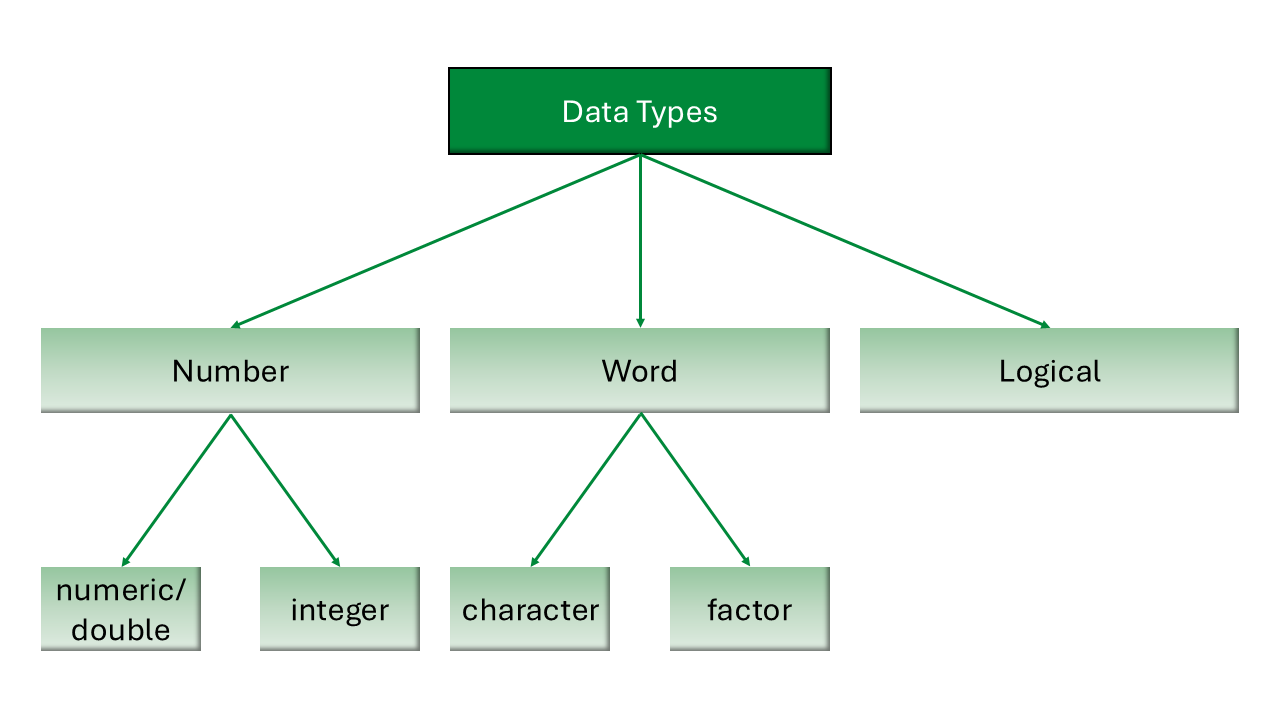
Data types
- These determine how R stores and processes data
- Data types can show different behavior across different operations
Data types: Operations
Can R perform the same operation on different data types?
- Two numeric variables can be summed up:
- A numeric and a character variable cannot be summed up:
Objects and assignment
Objects and assignment
Everything in R is an object, and oftentimes, we want to work with an object repeatedly.
- Assign a value to an object using the assignment arrow
<-
The assignment arrow points to the object
Take note of the order: we put the variable or object name first, then the assignment arrow <-, and lastly the number or value. The arrow should be pointing the object- it would not work if you put 1 <- x
Objects and assignment
The object then appears in the Environment pane (top right pane).
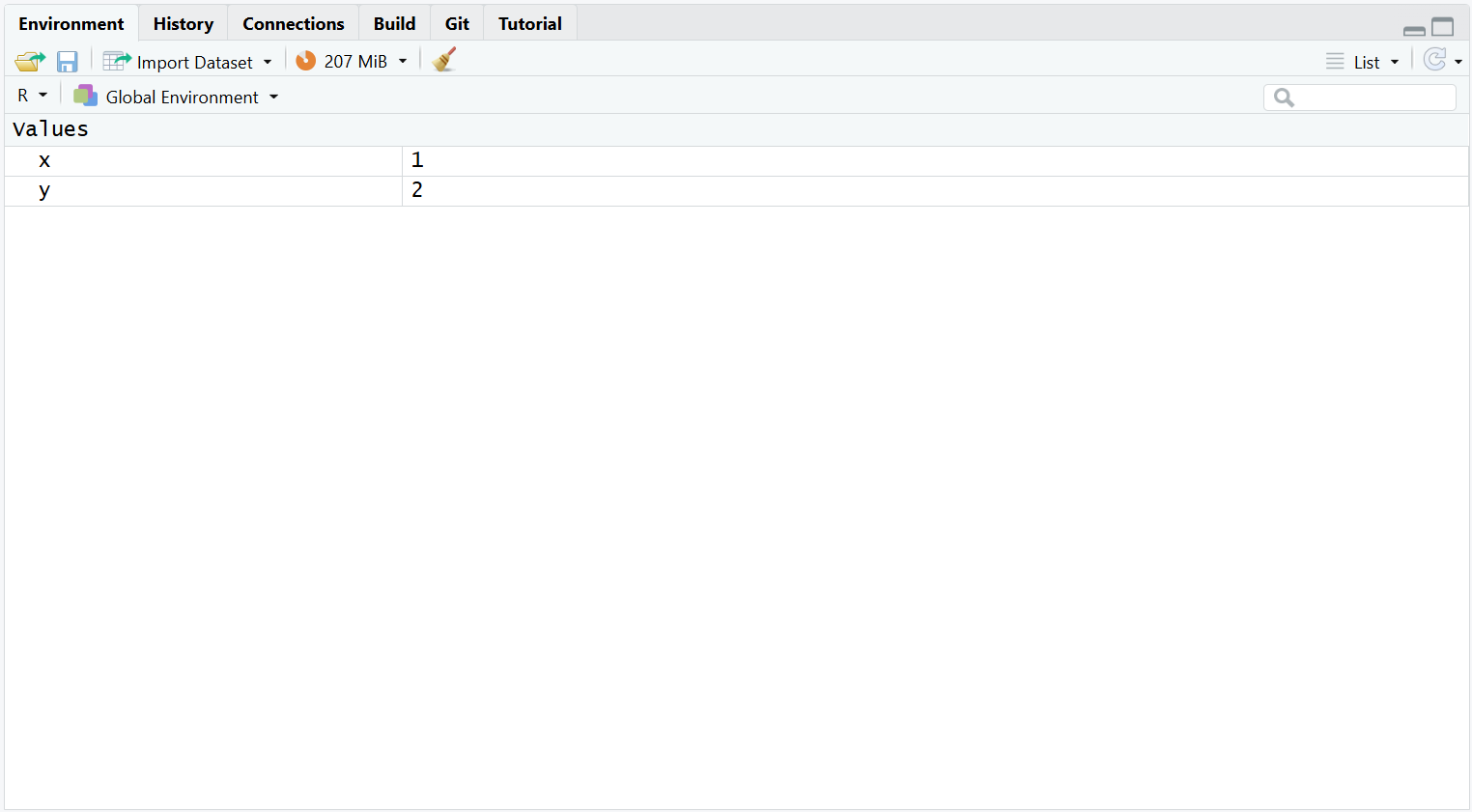
Practical exercise 4
Try following the example and create your objects!
Objects and assignments
Okay, I made objects… what now?
- Assigning objects helps organize your values
- Call on them and use specific objects in new operations
Practical exercise 5
Let’s use the objects in a new operation:
Object reassignment
When you reuse an object name and assign it a new value, R overwrites the previous value.
Functions
What is a function?
- A function is a reusable block of code that performs a specific task.
- You provide input values (arguments), and R returns an output based on internal operations.
- Analogous to a mathematical function:
- If
f(x) = 2 * x, then inputtingx = 3returns6.
- If
- Every function has a unique name, followed by parentheses
(), such assum().
The c() function
- Group items with the
c()function to manipulate multiple items at once.
[1] 60food
Burger Pasta Pizza
1 2 1 Common built-in functions: Numeric
R comes with many built-in numeric functions:
| Function | What it does | |
|---|---|---|
sum() |
Adds all values together | |
mean() |
Calculates the arithmetic mean (average) | |
sd() |
Calculates the standard deviation | |
exp() |
Calculates the exponential function (\(e^x\)) | |
round() |
Rounds a number |
Practical exercise 6
Common built-in functions: Character
R also comes with many built-in character functions:
| Function | What it does |
|---|---|
sort() |
Sort values in alphabetical order |
unique() |
Shows the unique values in the set |
table() |
Counts the values in a table |
toupper() |
Transforms all the letters to uppercase |
tolower() |
Transforms all the letters to lowercase |
Function arguments
Most functions take multiple arguments (inputs).
- Arguments are the pieces of information a function needs to carry out an operation.
- Different functions expect different types and numbers of arguments, and the output of a function often depends on the arguments that are supplied.
- It might look something like this:
function_name(argument1 = x, argument2 = y)
Do all functions need multiple arguments?
No, not all functions need multiple arguments, but for some, it is required.
Function arguments
Example: The round() function
- This function uses two arguments: It approximates a number (x) to a specified amount of decimal places (digits).
- You can provide arguments by position or by name.
Naming your arguments makes your code easier to read!
If you name the arguments (using the names “x” and “digits”), the order does not matter: round(digits = 2, x = 3.14159) works identically.
Practical exercise 7
Ignoring the digits argument
If you are curious, try running the round() function without specifying the digits = argument. What happens? Why might that be?
Pre-break quiz
What does the # symbol do in R?
- Runs the code
- Creates a variable
- Starts a comment
- Multiplies numbers
What happens when you “run” code in R?
- The code is deleted
- R executes the command
- The code becomes a comment
- RStudio closes automatically
What will R return for this comparison?
49 < 50
- TRUE
- FALSE
- 49
- ERROR
Which of the following is a character value in R?
- TRUE
- 5
- “hello”
- 4.2
Why does the following produce an error?
4 + "five"
- “five” is a logical value
- The quotation marks are incorrect
- 4 is not numeric
- R cannot numerically add different data types together
Break! 15 minutes
Post-break quiz discussion
What do we see in the results?
The Help function
Do I have to memorize all of the functions and arguments?
- No!
- There is no need to memorize functions and their arguments.
- You will remember the ones you use frequently through practice.
- When you need to understand how a function works, what inputs it needs, or what its defaults are, you can consult the Help Function.
How to access Help in R
There are two main ways to look up a function.
Method 1: Using the Console
- Type a question mark
?into the console immediately followed by the function name and press Enter.
How to access Help in R
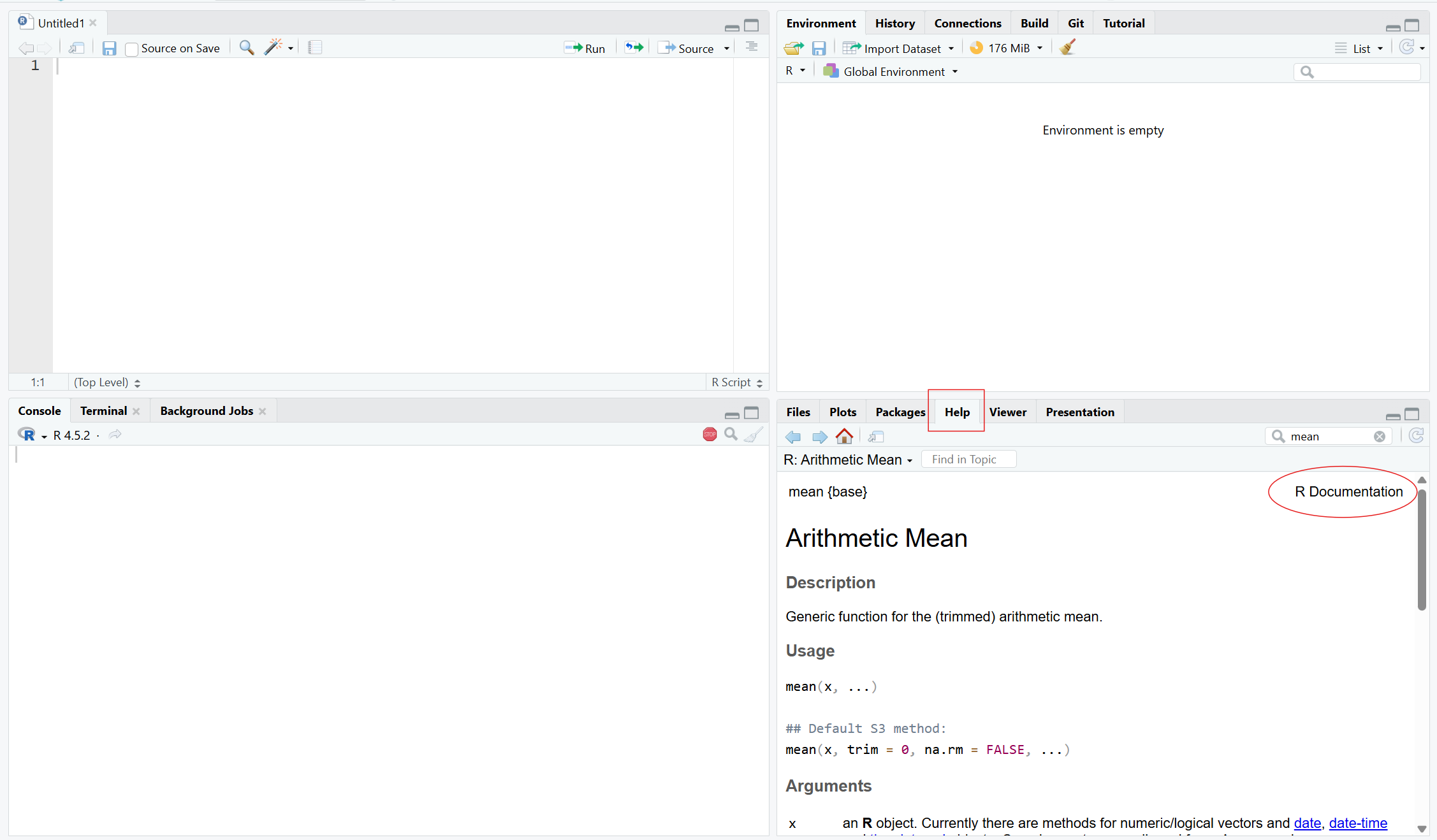
Method 2: Using the Help Tab
- Navigate to the Help tab in the bottom right pane of RStudio and type the function name into the search bar.
Reading the documentation
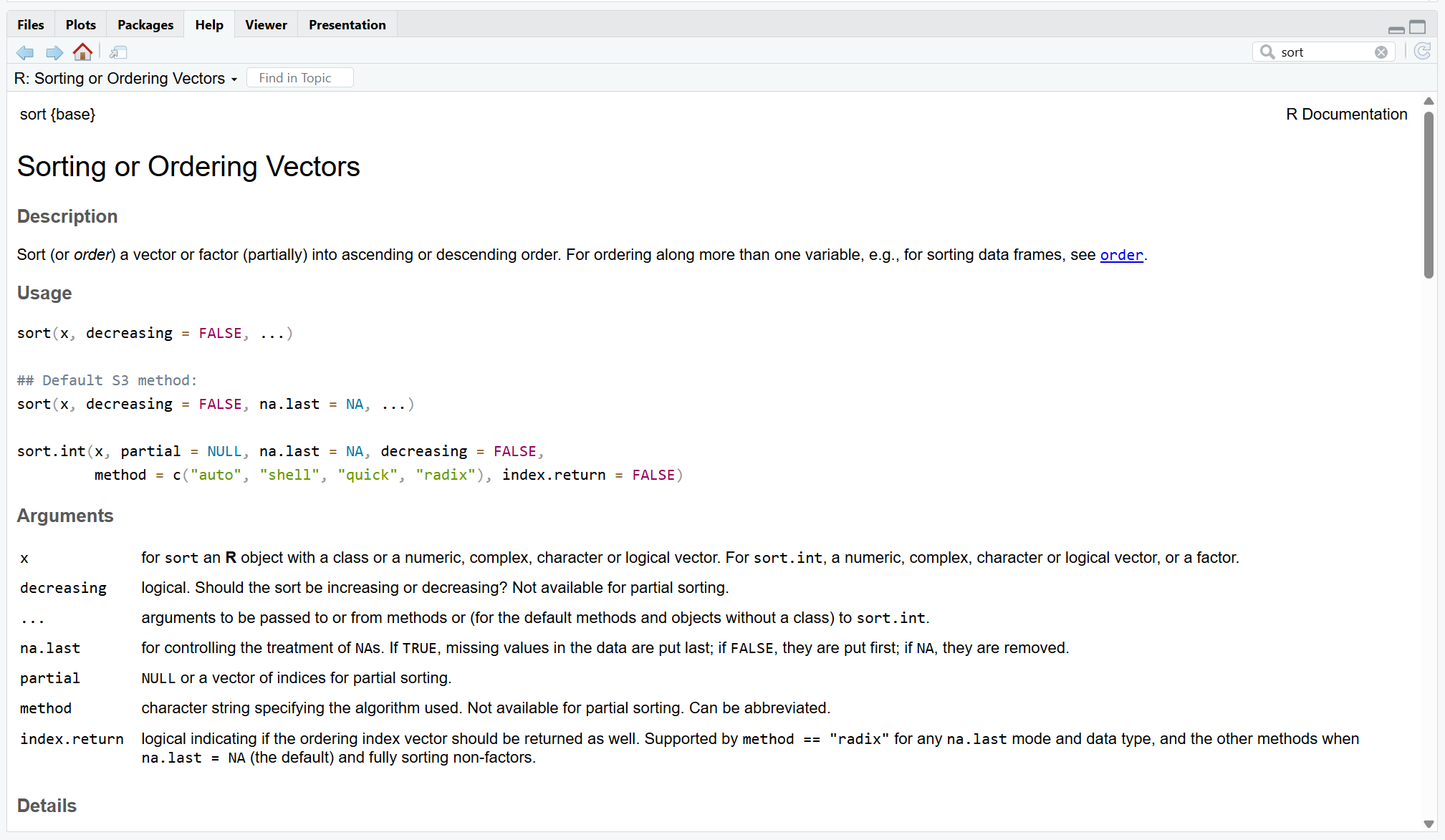
Help pages can look intimidating, but you only need to focus on a few key sections:
- Description: A brief summary of what the function does.
- Usage: Shows the function with all arguments. This is where you see default values.
- Arguments: Detailed explanations of what each input to the function should look like.
Reading the documentation
Example: For the sort() function we can see that it can also use character vectors or values as input and orders them.
Practical exercise 8
Is reverse alphabetical order increasing or decreasing?
Reverse alphabetical order means arranging items from Z to A. This means that the order is decreasing.
Vectors, lists, and data frames
Data structures in R
Collections of values are called data
R provides ways to store data in different data structures:
- Vectors
- Lists
- Dataframes
Vectors
What does a vector do? Stores multiple values in an object.
- It is a one-dimensional collection of data
- Useful for storing scores, ages, measurements, names, and more
Example:
Vectors and data type
What do you notice about the values in the vector stored in scores? All values in a vector should be of the same data type.
Practical exercise 9
Character data type
Reminder: character data types need to be wrapped in quotation marks " ".
Lists
What does a list do? Stores different types of data together.
- It is also one-dimensional
- But, unlike vectors, it can contain different data types (e.g., numeric, character…)
Example for a list:
Dataframes
What does a dataframe do? Stores data in rows and columns.
- It is two-dimensional
- Rows represent observations, columns represent variables
| Name | Age | Food |
|---|---|---|
| Tim | 19 | Pizza |
| Tom | 20 | Pizza |
| Anna | 21 | Pasta |
Look familiar?
Think of a dataframe like a spreadsheet. The top row is the heading and the information below (within each column) is the observation corresponding to the heading.
Practical exercise 10
Create a dataframe with the data.frame() function
Indexing
What does indexing do? Allows us to access specific parts of our data, such as:
- Select individual or multiple values
- Access rows and columns in a dataframe
Indexing vectors
Each element in a vector has a position.
| Position | 1 | 2 | 3 |
|---|---|---|---|
| Value | 19 | 20 | 21 |
Indexing vectors
Selecting individual values
- Use
[ ]to call on a value by its position
Indexing vectors
Selecting multiple values
You can retrieve more than one value at once.
You can also select a range:
Indexing dataframes
Accessing rows and columns in a dataframe
You can call on values directly from the row and column of data frames.
To use indexing, use
[ ]and follow this general format:dataframe[row,column]
Accessing columns by name
Calling values by using just numbers can get confusing.
Luckily, there is a way to call on the values by column name using the $ operator: dataframe$column_name
- Use it to retrieve all values from that specific column
- It is easier to read than using column numbers
Combining $ and []
Look at the following example to see how $ and [ ] can be used together:
What does this do?
$selects the food column in thepeople_datadata frame[]gives you the third value
Practical exercise 11
Use $ and [] accordingly to retrieve the following information from the the people_data data frame:
Wrapping Up
Looking into the future
- Take a minute to think about the following questions, first for yourself, then in a pair:
Can you identify some practical benefits of using R/RStudio?
What obstacles do you anticipate in using it consistently?
How can R/RStudio support you in your upcoming projects?
- Share your thoughts with the group.
Assignment: Consolidating what you learned
Create a short R script that builds on what was covered today
- Assign at least two objects, for example numbers or words.
- Create at least one vector using c() and assign it to an object.
- Perform at least one mathematical operation using an object with numerical values. Use at least one built-in function, such as
sum(), mean(), length(), sort(),ortable(). - Use at least one logical comparison to check a condition.
- Practice indexing by retrieving one specific value from a vector using
[]. - Include clear comments using # to explain each step.
Self-Assessment
Use this assignment to assess your learning of, and progress with, R/RStudio; reflect on any challenges you faced and how you overcame them.
Take-home messages
- R → your go-to tool for data analysis and quantitative research.
- RStudio interface → helps you organize code, outputs, and data efficiently.
- Writing and saving R scripts ensures your work is reproducible and well-documented.
Learning goals: Check-In
Where are we at?
- To navigate the RStudio interface (Console, Environment, Script, and Output panes) ✅
- To differentiate between basic data types in R (numeric, character, logical, integer) and how they are used ✅
- To execute operations in the R using appropriate operators ✅
- To assign and re-assign values, vectors, and lists to objects ✅
- To specify arguments within functions to modify how the function produces its output ✅
- To index dataframes to access and retrieve specific information ✅
To conclude: Survey time!
On a scale of 1–5, how intimidated do you feel by programming or coding (e.g., R/RStudio) after completing this session? (1 = Not intimidated at all, 5 = Very intimidated)
- 1
- 2
- 3
- 4
- 5
How confident do you feel using the RStudio environment after this session?
- Not confident at all
- Slightly confident
- Moderately confident
- Very confident
- Extremely confident
How comfortable do you feel about using R and RStudio for mathematical operations?
- Not comfortable at all
- Slightly comfortable
- Moderately comfortable
- Very comfortable
- Extremely comfortable
How comfortable do you feel using R objects (e.g., vectors and data frames) to organize and manipulate your research data?
- Not comfortable at all
- Slightly comfortable
- Moderately comfortable
- Very comfortable
- Extremely comfortable
What part of the lesson, if any, still feels confusing or unclear?
4. Was there a practical exercise or example that helped your understanding the most? Why?
Discussion of survey results
What do we see in the results?
Thanks!
See you next time!
Practical exercise 1: Solutions
Practical exercise 2: Solutions
Practical exercise 6 & 7: Solutions
Practical exercise 8: Solutions
Practical exercise 9: Solutions
Practical exercise 10: Solutions
Practical exercise 11: Solutions
Additional resources
- Datacamp offers a free, interactive course on R online: link to the course.
- Here is a free-to-use RSdtudio user guide: https://docs.posit.co/ide/user/
Contribution statement
Creator: Sanchez Steinhagen, Caterina Luz ( 0009-0006-4783-1110)
Creator: Sharma, Tejaswini ( 0000-0000-0000-0000)
Creator: Waterfield, Elizabeth ( 0009-0006-3725-6730)
Creator: Rieger, David ( 0009-0004-3701-3101)
Reviewer: Von Grebmer zu Wolfsthurn, Sarah ( 0000-0002-6413-3895)
Reviewer: Middleton, Sara Lil ( 0000-0002-6413-3895)
License and citation statement

This work was originally created by Nicklas Hafiz. His work was subsequently adapted by Caterina Luz Sanchez Steinhagen, Tejaswini Sharma, David Rieger, Elizabeth Waterfield, Sara Lil Middleton and Sarah von Grebmer zu Wolfsthurn. The current work is licensed under a Creative Commons Attribution 4.0 SA International License (CC-BY-SA 4.0). Code snippets are dedicated to the public domain and are licensed under a Creative Commons Universal Licence (CC0 1.0).
Please cite these materials as: Sanchez-Steinhagen, C. L., Sharma, T., Rieger, D., Waterfield, E., Middleton, S., & Von Grebmer zu Wolfsthurn, S. (2026). Introduction to R: Part I [Quarto slides]. LMU Open Science Center. https://lmu-osc.github.io/teaching-material-for-novices/open-research-tools/r-part-I

LMU Open Science Center