14/10/2026
Prerequisites
Before completing this session, please carefully read about the necessary prerequisites.
| Prerequisite | Description | Where to find it |
|---|---|---|
| R and RStudio installed | Latest versions of both R and RStudio | Download RStudio |
| Basic R skills | Introduction to R - Part I | Access here |
| Advanced R skills | Introduction to R - Part II | Access here |
| Basic Git skills | Introduction to version control with Git in RStudio | Access here |
| Collaborating on GitHub | Introduction to collaborative coding with GitHub | Access here |
| Zotero | Reference Management Tool | Download Link |
During this session, we will be using Quarto from RStudio. To set up Quarto, follow these steps:
On a scale of 1 to 5, what is your level of familiarity with Quarto (e.g., Quarto concepts, tools within Quarto)? (1 = Not familiar at all, 5 = Very familiar)
1
2
3
4
5
Which of the following concepts or skills do you feel most confident about when using Quarto? (Select all that apply)
Creating and rendering basic Quarto documents (.qmd)
Using YAML headers to customize document settings (e.g., title, author names, output format)
Embedding R or Python code chunks and viewing output
Producing PDF, HTML or Word documents with Quarto
Using Quarto in combination with version control (e.g., Git, GitHub)
Including citations and bibliographies via a citation manager
None of the above
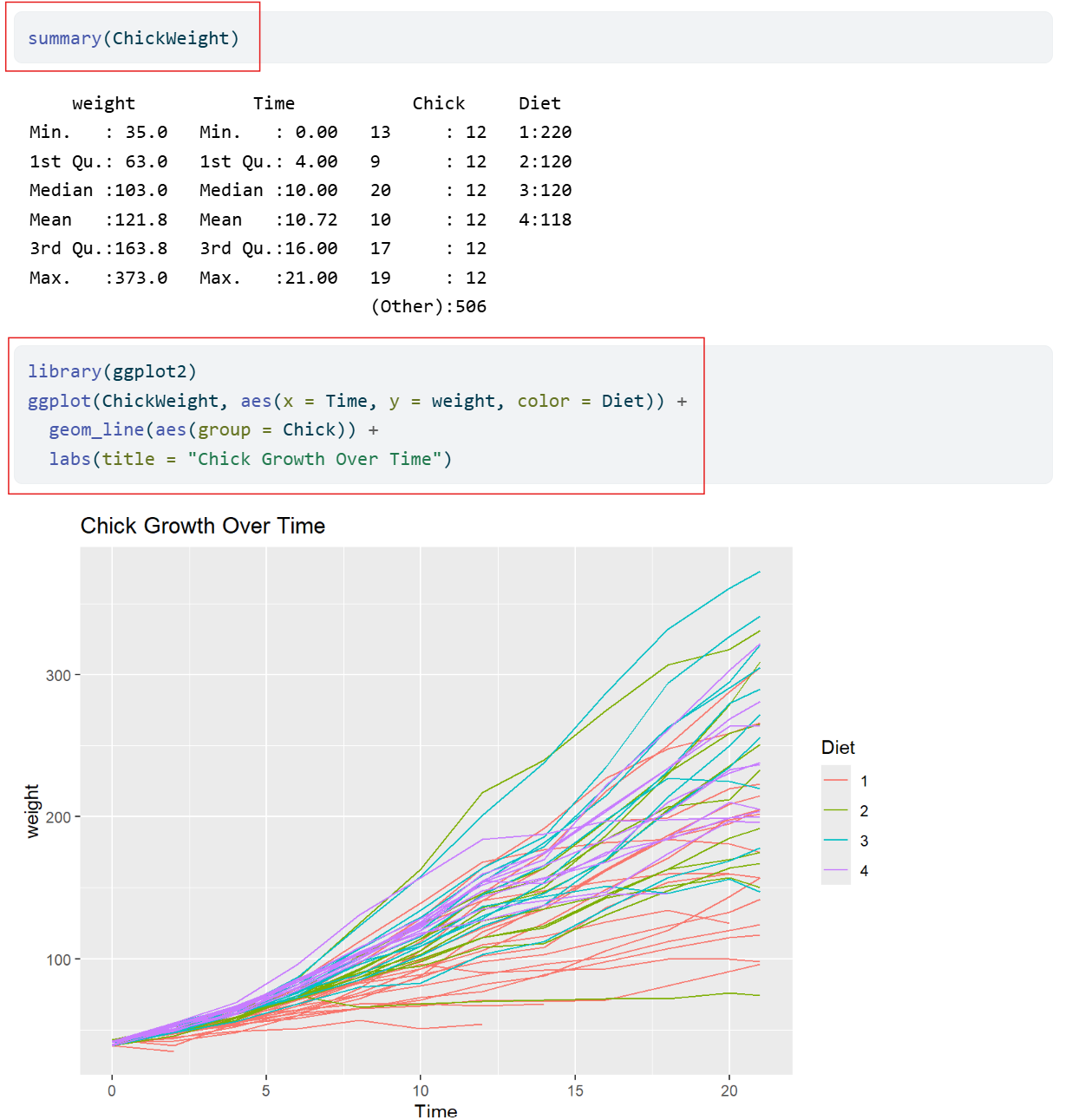
What do we see in the results?
Quarto and Open Science
Quarto is a tool that can help us connect ideas, data, and people through open and reproducible research.
At the end of this session, you should be able to:
Note
The YAML header, code chunks, and markdown text are the components of the .qmd file.
An open-source scientific and publishing system that combines text, code and media to produce transparent and reproducible work that can be freely accessed by others.
With Quarto, you can easily:
Quarto Website
You can always check out the Quarto Website to learn more.
| Step | Traditional workflow | Quarto workflow |
|---|---|---|
| Write text | e.g., in an MS Word document | Same file |
| Run analysis | e.g., in a code editor | Same file |
| Insert results | Copy-paste results | Automatic |
| Generate figure | in statistical programme | Same file |
| Update results | Manual redo | Re-run document |
| Update figure | Manual redo | Re-run document |
Current challenges:
How Quarto can help:
What is rendering? The process where Quarto runs the code, combines it with the text, and creates a final output.
There are two ways to render in Quarto:
You can find both Render on Save and Manual Rendering at the top of your workspace.
You can write Quarto documents in Source mode or Visual mode in RStudio.
Source mode allows you write directly in plain text/Markdown Syntax, allowing for more control and it’s closer to raw code
Visual mode gives a WYSIWYM-style interface which is easier for beginners, but sometimes hides syntax
Note
Choosing modes is part of the authoring process, and it allows you to format the text, add code, and build your document.
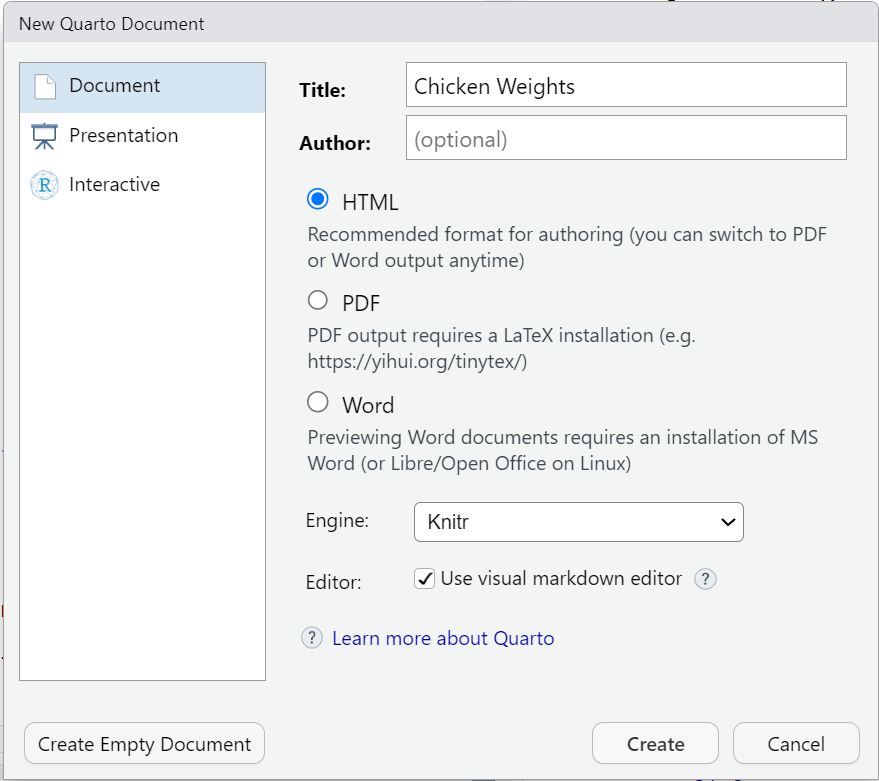
These are the steps to create a Quarto Document in RStudio:
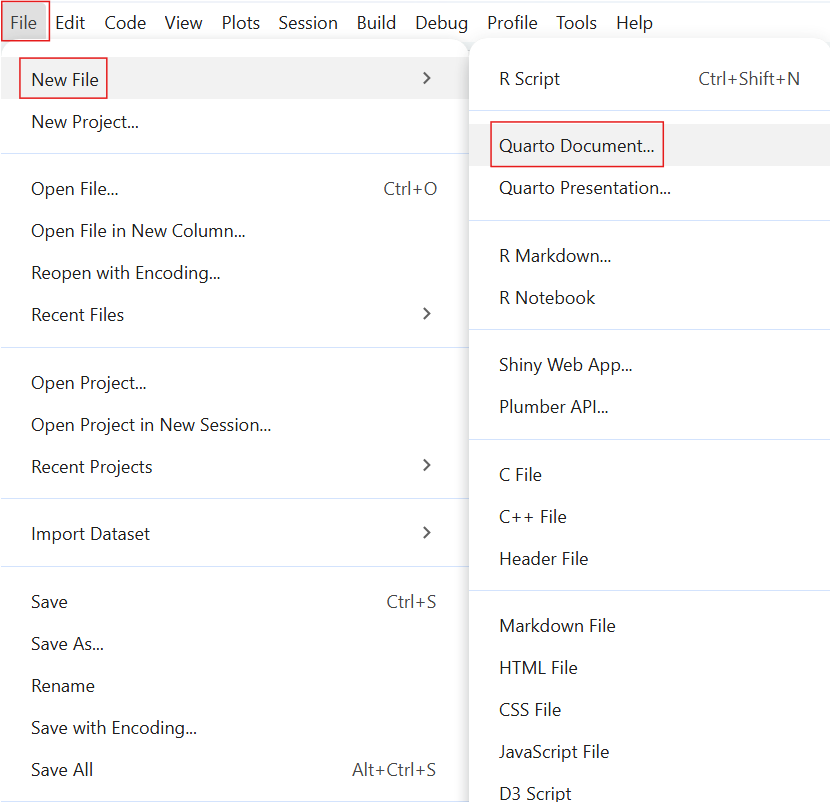
File”New File”Quarto Document”
title of your documentoutput format (the default format is HTML)Create”Why make a new folder?
Creating a folder on your device helps you stay organized! Keeping all the files (such as Quarto documents and images) in one designated folder makes it easier for you to store and retrieve all materials related to the project or exercise.
What is authoring?
To practice authoring in Quarto, let’s start with setting the YAML header and adding markdown text in Source mode.
Output format
In future projects, you can replace “html” to render the document to a different format.
Here is a link to a list of the different output formats, including PDF, docx, ePub for e-book readers, pptx, and much more.
Basic Markdown Text Formatting:
- bullet point**bold** → bold*italic* → italic~~text~~ → Inline code: `code` → codeMarkdown text shortcuts
Here is a link for the full list of markdown text shortcuts for formatting!
This is an example of markdown text. Let’s use it to continue authoring and building our document.
Quarto callout boxes can highlight important aspects of your document or provide supplementary information.
Important with Title
This is an example of a callout box to highlight particularly important information using callout-important
Tip with Title
This is an example of a callout box to give important tips using callout-tip
Note with Title
This is an example of a callout box to include additional information or context using callout-note
Warning with Title
This is an example of a callout box to include additional information or context using callout-warning
Here is the markdown text for inserting a callout note box:
Important elements:
:::-note”##When rendered, it should look like this:
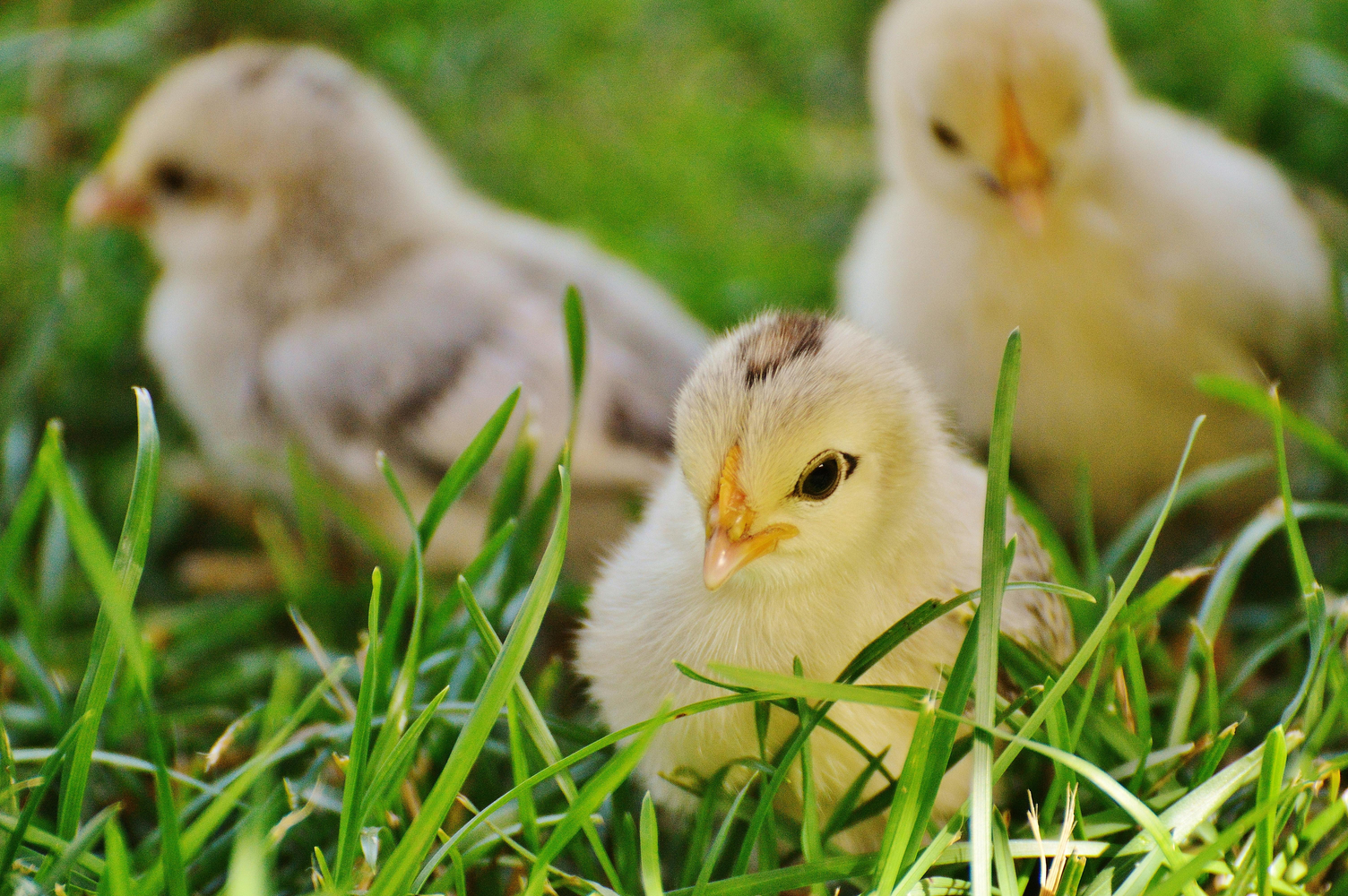
Based on Real Data
The ChickWeight dataset in R is based on real experimental data.
= Sections of the document where you can write and execute pieces of code
There are multiple ways to insert code chunks:
Simply click the green Insert Code Chunk button on the toolbar 
You can manually type 3 back ticks ``` then {r} to start a coding chunk, enter your code, then end the chunk with 3 back ticks
You can use the keyboard shortcut Ctrl + Alt + I (Windows/Linux) or Cmd + Option + I (Mac) to insert a code chunk then simply enter your code

These are examples of R code chunks. Let’s use these to insert code chunks in our document.
Adjust how the code is portrayed by editing the YAML header:
code-fold: false which means the code is visible and not collapsible.Here are some other code display settings that we can incorporate into our YAML header:
code-fold: true collapses the code so the reader can expand itcode-tools: true adds the functions “show code” at the top of the page and “copy” next to the chunksecho: true both the code and the output is visibleLet’s edit the YAML header to make the code chunks collapsible and add code tools.
In the YAML header, under the html section:
Here’s a quick recap of what we have learned in this lesson so far:
✅Create a new Quarto Document in RStudio
✅Edit and render the Quarto Document as a website
✅Use key Quarto features like code chunks, YAML headers, and output formatting
What’s the typical format of Quarto Markdown document?
.png file
.qmd file
.docx file
.mp3 file
In a Quarto document, what is the YAML header?
Summarizes the document into a single line
A place inside the Quarto document to store notes
The title of the document
The “settings” of the document
In a Quarto document, which component is primarily responsible for formatting narrative text (e.g., headings, bold text, lists, and paragraphs)?
Markdown text
YAML header
Code chunks
All of the above
What do we see in the results?
Quarto offers additional authoring features that make it more versatile and comprehensive. These include:
Commonly used authoring features
If you want to learn more about advanced authoring features, click here for commonly used markdown syntax for additional authoring features.
Link with title: [title](link)
[Quarto Website](https://quarto.org) → Quarto Website[Click here to see more information on reveal.js](https://revealjs.com) → Click here to see more information on reveal.jsLink without title: <https://link>
<https://www.markdownguide.org/> → https://www.markdownguide.org/<https://github.com/> → https://github.com/

You can even add a link to an image so that when you click anywhere on the image, it redirects you to that website.
[](link)
What is Zotero? A free reference management tool to collect, organize, cite, and share research sources.
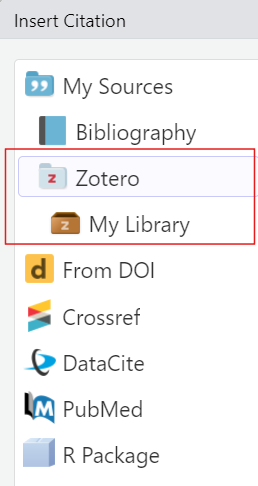
To insert a citation:
Switch to the “Visual Editor” mode
→ Press the “Insert” button in the toolbar and select “Citation”
→ In the Zotero library, select the citation and click “Insert”
What you will notice:
bibliography: references.bib will be added to the YAML header
After rendering, a reference list or bibliography will be automatically generated at the end of the document with the citations used.

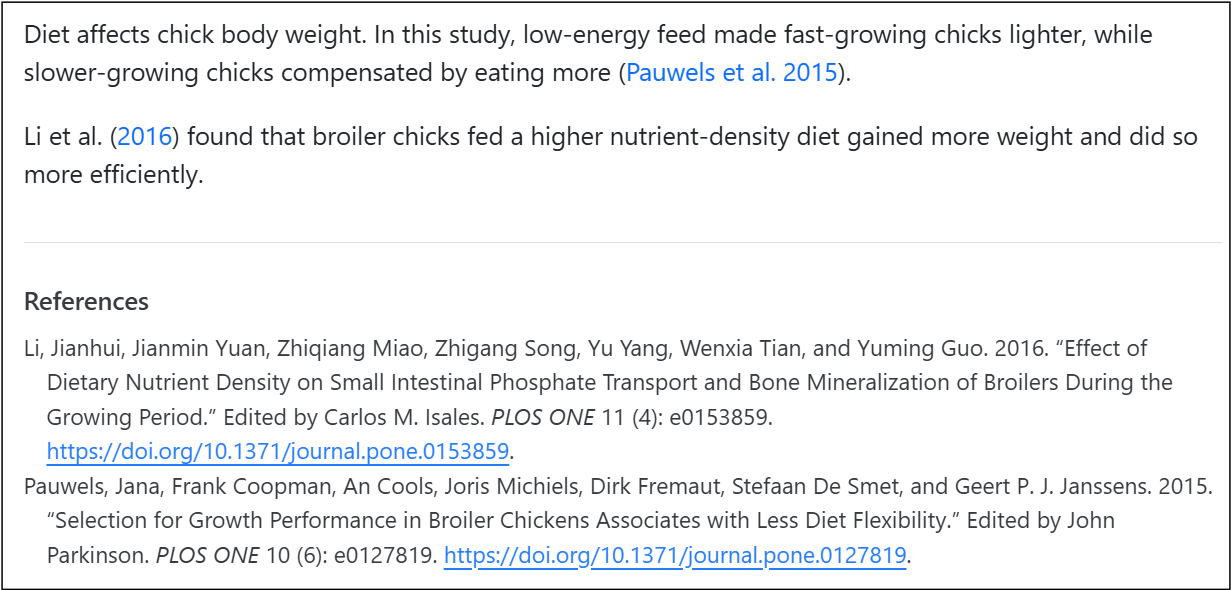
Each citation is assigned a short citation key based on the author and year (for example, “pauwels2015”).
Quickly cite in your document’s text using the citation key:
[@pauwels2015]).@li2016. No square brackets.Let’s practice adding a citation using Zotero.
Now, let’s practice adding in-text citations!
In your output, you should now have:

Changing the citation style
You can change the citation style by using Citation Style Language (csl) files directly from the Zotero website. For example, putting “csl: https://www.zotero.org/styles/apa” in your YAML changes the citation style to APA.
What is publishing with Quarto?
= the process of sharing the rendered documents or projects online so it can become accessible to others.
List of publishing services
When sharing your work, it’s important to follow established rules and standards. This includes:
List of publishing services
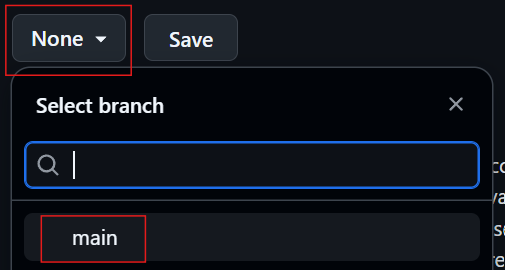
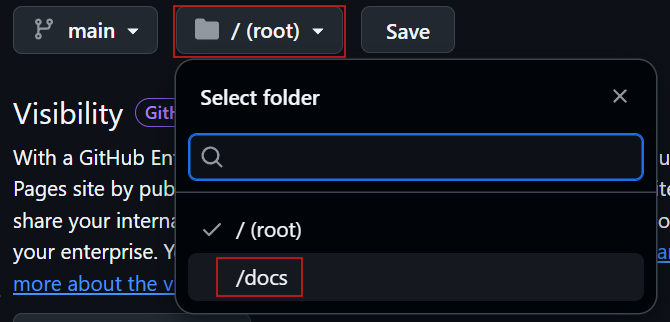
A great option to share your document is publishing to GitHub.
GitHub Pages enables you to publish content based on source code managed within a GitHub repository.
Three methods to publish a Quarto document to GitHub Pages:
docs directory and pushing it to your repositoryquarto publish commandGitHub Actions to auto-render and publish whenever you push changesLet’s publish our document using the first method:
Render to docs
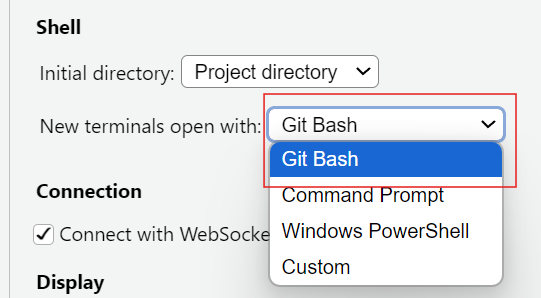
Work directly from the Terminal in RStudio.
Terminal” → then “New Terminal”Terminal” → “Terminal Options...”, set it to open with Git Bash, then open a new terminal.
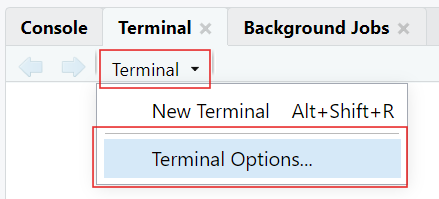
Here is an example of setting the directory using cd: 

Why we add .nojekyll
Adding a .nojekyll file to the root of your repository tells GitHub Pages not to do additional processing of your published site using Jekyll


Let’s discuss how useful Quarto can be for open research. Consider the following questions:
Let’s wrap up by identifying the key takeaway from today’s session together.
Ask yourself: “If you had to explain to a colleague in one sentence why learning Quarto matters for research and teaching, what would you say?”
After learning about Quarto in today’s lesson, use this homework assignment to:
On a scale of 1 to 5, what is your level of familiarity with Quarto now after the session (e.g., Quarto concepts, tools within Quarto)? (1 = Not familiar at all, 5 = Very familiar)
1
2
3
4
5
Which of the following best describes Quarto?
quarto is a programming language
Quarto is a publishing system for reproducible documents
Quarto is a code editor
Quarto is a version control system
Which components are combined in the authoring process of Quarto documents?
Only YAML
Only Markdown
Both YAML and Markdown
None of the above
Which of these are examples of Markdown text formatting? (Select all that apply)
Bold text
Code chunks
Hyperlinks
Italic text
What is the purpose of code chunks in Quarto documents?
To include executable code and results within the document
To hide metadata
To insert references at the end of the document
To format text in a clear and concise manner
Why is including code in research documents important?
To make the document more difficult to read
To ensure only the author can reproduce results
To replace data collection
To make research reproducible and transparent
Allaire, J., Teague, C., Scheidegger, C., Xie, Y., Dervieux, C., & Woodhull, G. (2025). Quarto (Version 1.8) [Computer software]. https://doi.org/10.5281/zenodo.5960048
Bregendahl, K., Sell, J., & Zimmerman, D. (2002). Effect of low-protein diets on growth performance and body composition of broiler chicks. Poultry Science, 81(8), 1156–1167. https://doi.org/10.1093/ps/81.8.1156
Duit, R., & Treagust, D. F. (2003). Conceptual change: A powerful framework for improving science teaching and learning. International Journal of Science Education, 25(6), 671–688. https://doi.org/10.1080/09500690305016
Forehand, M. (2010). Bloom’s taxonomy. Emerging perspectives on learning, teaching, and technology, 41(4), 47-56.
Li, J., Yuan, J., Miao, Z., Song, Z., Yang, Y., Tian, W., & Guo, Y. (2016). Effect of Dietary Nutrient Density on Small Intestinal Phosphate Transport and Bone Mineralization of Broilers during the Growing Period. PLOS ONE, 11(4), e0153859. https://doi.org/10.1371/journal.pone.0153859
Pauwels, J., Coopman, F., Cools, A., Michiels, J., Fremaut, D., De Smet, S., & Janssens, G. P. J. (2015). Selection for Growth Performance in Broiler Chickens Associates with Less Diet Flexibility. PLOS ONE, 10(6), e0127819. https://doi.org/10.1371/journal.pone.0127819
Ryba, R., Doubleday, Z. A., Dry, M. J., Semmler, C., & Connell, S. D. (2021). Better Writing in Scientific Publications Builds Reader Confidence and Understanding. Frontiers in Psychology, 12, 714321. https://doi.org/10.3389/fpsyg.2021.714321
Tierney, N. (2025). Quarto for scientists. https://qmd4sci.njtierney.com/
Creator: Waterfield, Elizabeth (
0009-0006-3725-6730)
Reviewer: von Grebmer zu Wolfsthurn, Sarah (
0000-0002-6413-3895)
Reviewer: Schönbrodt, Felix (
0000-0002-8282-3910)
Consultant: Ihle, Malika (
0000-0002-3242-5981)
This work was originally created by Florian Pargent, Florian Kohrt, and Phillip Sckopke from the Faculty of Psychology at LMU Munich. This current work by Elizabeth Waterfield, Malika Ihle, Felix Schönbrodt and Sarah von Grebmer zu Wolfsthurn is licensed under a Creative Commons Attribution 4.0 International SA License (CC-BY-SA-4.0). Code snippets are dedicated to the public domain and licensed under a Creative Commons Universal License (CC0 1.0).
Please cite these materials as: Waterfield, E., Ihle, M., Schönbrodt, F., & Von Grebmer Zu Wolfsthurn, S. (2026). Introduction to Quarto [Quarto slides]. LMU Open Science Center. https://lmu-osc.github.io/teaching-material-for-novices/open-research-tools/quarto

LMU Open Science Center